
DDL
DDL允许用户定义数据,也就是创建表、删除表、修改表结构这些操作。通常,DDL由数据库管理员执行。
1 建表
DROP TABLE students;  -- 删表
CREATE TABLE students(
    id   int AUTO_INCREMENT COMMENT 'ID' primary key,
    name varchar(100) NOT NULL null COMMENT '学生名称',
	code varchar(100) NOT NULL COMMENT '学生代码',
	class_id INT(13) NOT NULL REFERENCES classes(id), COMMENT '班级id'
)COMMENT '学生表';

PRIMARY KEY: 主键   REFERENCES:外键    COMMENT: 注释
UNIQUE:必须    AUTO_INCREMENT: int类型自动体征
2 主键
--主键
-- 撤销主键 搞了之后很麻烦 谁没事撤销主键
ALTER TABLE 表名 drop PRIMARY key;

ALTER TABLE students DROP PRIMARY KEY ;
-- 设置主键
ALTER  TABLE 表名  add  PRIMARY KEY(字段列表);

ALTER TABLE students ADD PRIMARY KEY (id);
-- 重设置主键自动增长开始值
ALTER TABLE students AUTO_INCREMENT = 10;
3 外键
--增加外键
ALTER TABLE 需要添加外键的表名 ADD CONSTRAINT  外键名
FOREIGN KEY(本表字段列表)  REFERENCES  主表名(字段列表);

ALTER TABLE students ADD CONSTRAINT fk_class_id
FOREIGN KEY (class_id) REFERENCES classes (id);

--删除外键
alter table 表名 drop foreign key 外键名;

--建表的时候增加
constraint  外键名  foreign  key(本表字段列表)  references  主表名  (主表字段列表);
4 索引
-------增加索引
# 普通索引
alter table table_name add index index_name (column_list);
# UNIQUE索引
alter table table_name add unique index_name (column_list) ;

栗子
ALTER TABLE students ADD INDEX idx_code (code);
-- 多列索引  没必要
ALTER TABLE students ADD INDEX idx_name_code (name, code);
-- 唯一索引
ALTER TABLE students ADD UNIQUE INDEX uni_code (code);

------删除索引
# 删除普通索引 和 UNIQUE索引
alter table table_name drop index index_name ;
DQL
- DQL允许用户查询数据,这也是通常最频繁的数据库日常操作。
1 .基本查询
SELECT 列名 FROM <表名>;
SELECT * FROM students;
SELECT `NAME`,`CODE` FROM students;
2 条件查询
SELECT * FROM <表名> WHERE <条件表达式>
SELECT * FROM students WHERE `code` ='ldc';
SELECT * FROM students WHERE `class_id` ='4';
3 投影查询
可以给列名映射为另一个名字显示
SELECT `NAME` AS 姓名,`CODE` AS 代码 FROM students;4 排序查询
- ORDER BY,可以指定多个,按先后顺序
- ASC 升序,默认 ;DESC 倒序
SELECT * FROM students ORDER BY code ,class_id DESC;5 分页查询
使用 LIMIT M OFFSET N ,其实就是跳过前N条,然后只取出M条,随着N的增加,效率越来越低。
SELECT * FROM students ORDER BY code DESC LIMIT 2 OFFSET 2;
LIMIT 2 OFFSET 2; 简写为 LIMIT 2,2;
6 聚合查询
| 函数 | 说明 |
|---|---|
| SUM | 计算某一列的合计值,该列必须为数值类型 |
| COUNT | 计算查询结果一共有多少条 |
| AVG | 计算某一列的平均值,该列必须为数值类型 |
| MAX | 计算某一列的最大值 |
| MIN | 计算某一列的最小值 |
SELECT COUNT(*) FROM students WHERE `class_id` ='4';
--分组聚合
SELECT COUNT(*) name,code FROM students GROUP  BY code;
7 多表查询
SELECT s.id sid,
s.name sname ,
s.code scode,
c.id cid,
c.name cname,
c.code code
FROM students s, classes c
WHERE s.class_id=c.id;
8 连接查询
- 内连接
SELECT s.id sid,
s.name sname ,
s.code scode,
c.id cid,
c.name cname,
c.code code
FROM students s INNER JOIN classes c
ON s.class_id=c.id;- 其他
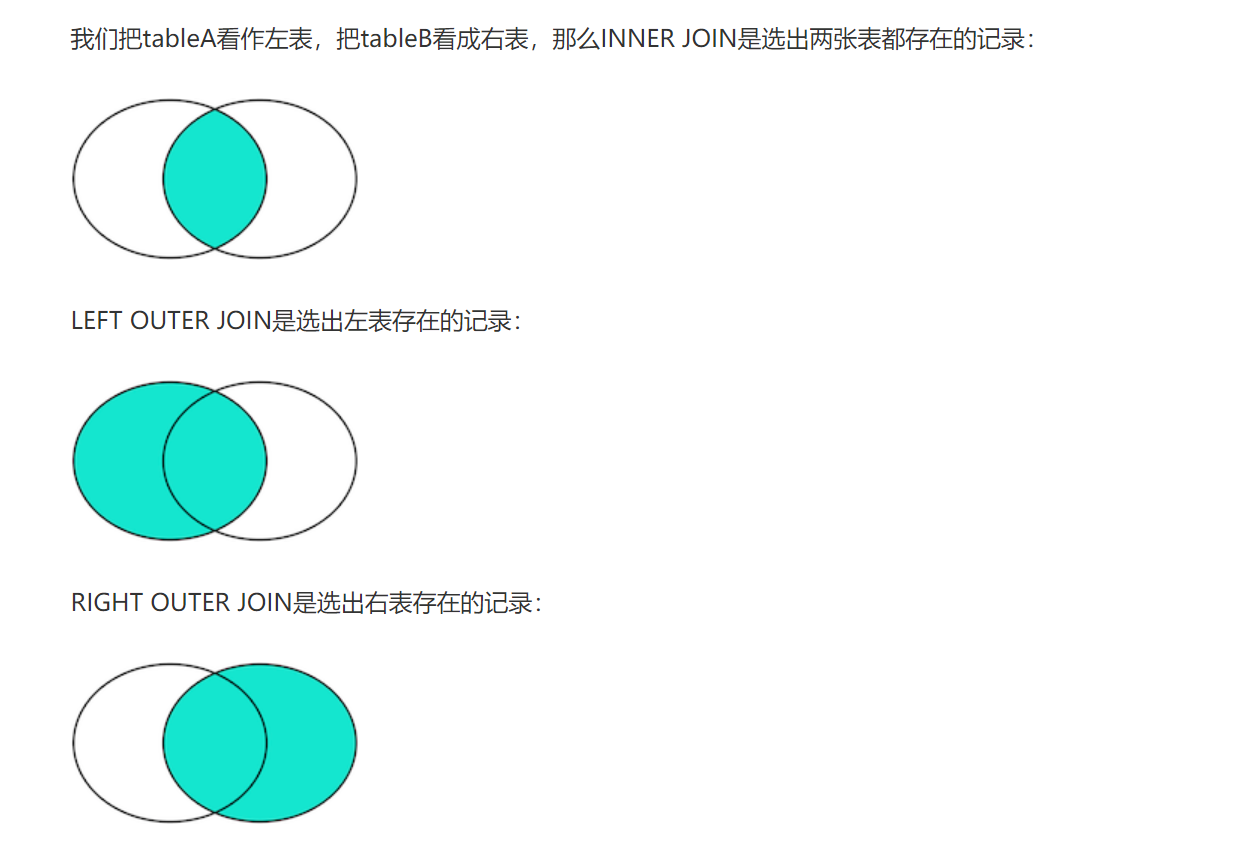
9 联合查询
- 两次查询结果的列必须一样
- UNION 去重
- UNION ALL 拼接所有
SELECT * FROM students WHERE class_id=3
UNION ALL
SELECT * FROM students WHERE class_id=4;
DML
DML为用户提供添加、删除、更新数据的能力,这些是应用程序对数据库的日常操作
1 INSERT
INSERT INTO <表名> (字段1, 字段2, ...) VALUES (值1, 值2, ...);

INSERT INTO dept (id, name) VALUES (1, '研发部'), (2, '市场部'),(3, '财务部'), (4, '销售部');
2 UPDATE
UPDATE 表名 SET 字段名1 = 值1 , 字段名2 = 值2 , .... [ WHERE 条件 ] ;

--修改id为1的数据, 将name修改为小昭, gender修改为 女
update employee set name = '小昭' , gender = '女' where id = 1;
3 DELETE
DELETE FROM 表名 [ WHERE 条件 ] ;

-- 删除gender为女的员工
delete from employee where gender = '女';
DCL
1 查询用户
select * from mysql.user;结果:

Host代表当前用户访问的主机
2 创建用户
CREATE USER '用户名'@'主机名' IDENTIFIED BY '密码';3 修改用户密码
ALTER USER '用户名'@'主机名' IDENTIFIED WITH mysql_native_password BY '新密码' ;4 删除用户
DROP USER '用户名'@'主机名' ;5 权限控制
MySQL中定义了很多种权限,但是常用的就以下几种:
| 权限 | 说明 |
|---|---|
| ALL, ALL PRIVILEGES | 所有权限 |
| SELECT | 查询数据 |
| INSERT | 插入数据 |
| UPDATE | 修改数据 |
| DELETE | 删除数据 |
| ALTER | 修改表 |
| DROP | 删除数据库/表/视图 |
| CREATE | 创建数据库/表 |
 --查询权限
SHOW GRANTS FOR '用户名'@'主机名' ;

-- 授予权限
GRANT 权限列表 ON 数据库名.表名 TO '用户名'@'主机名';
--授予 'wl'@'127.0.0.1' 用户test数据库所有表的所有操作权限
grant all on test.* to 'wl'@'127.0.0.1';

-- 撤销权限
REVOKE 权限列表 ON 数据库名.表名 FROM '用户名'@'主机名';
--撤销 'wl'@'127.0.0.1' 用户的test数据库的所有权限
revoke all on test.* from 'wl'@'127.0.0.1';
子查询
1 标量子查询
- 子查询返回的结果是单个值(数字、字符串、日期等),最简单的形式,这种子查询成为标量子查询。
- 常用的操作符:= 、>、>=、<、<=
-- 标量子查询
-- 1. 查询 "销售部" 的所有员工信息
-- a. 查询 "销售部" 部门ID
select id from dept where name = '销售部';

-- b. 根据销售部部门ID, 查询员工信息
select * from emp where dept_id = (select id from dept where name = '销售部');


-- 2. 查询在 "方东白" 入职之后的员工信息
-- a. 查询 方东白 的入职日期
select entrydate from emp where name = '方东白';

-- b. 查询指定入职日期之后入职的员工信息
select * from emp where entrydate > (select entrydate from emp where name = '方东白');
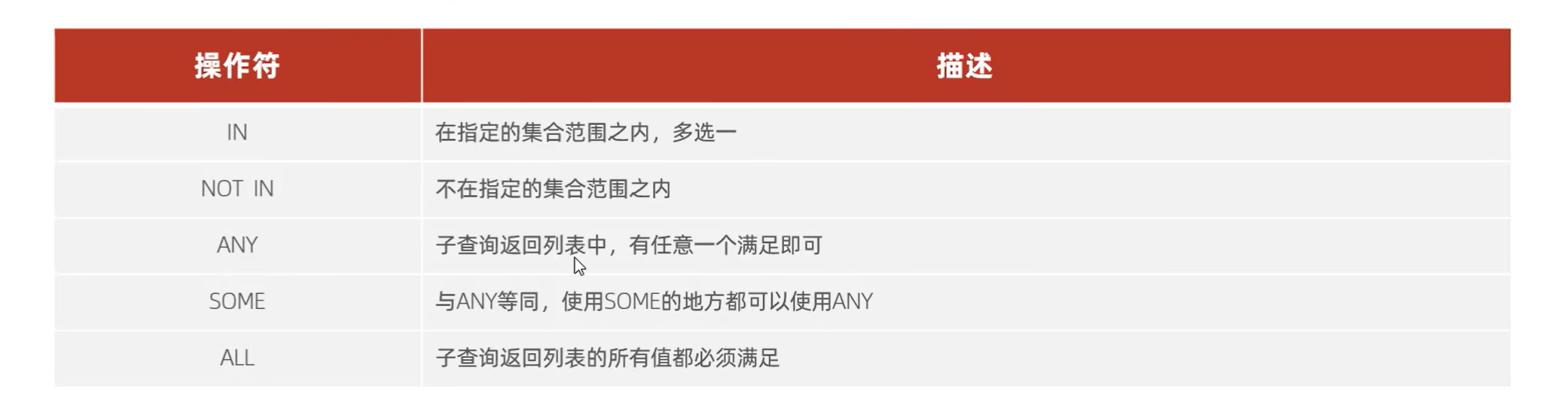
2 列子查询
子查询的结果是一列,这种子查询称为列子查询
常用操作符有 IN、NOT IN,、ANY、SOME 、ALL
-- 列子查询
-- 1. 查询 "销售部" 和 "市场部" 的所有员工信息
-- a. 查询 "销售部" 和 "市场部" 的部门ID
select id from dept where name = '销售部' or name = '市场部';

-- b. 根据部门ID, 查询员工信息
select * from emp where dept_id in (select id from dept where name = '销售部' or name = '市场部');


-- 2. 查询比 财务部 所有人工资都高的员工信息
-- a. 查询所有 财务部 人员工资
select id from dept where name = '财务部';

select salary from emp where dept_id = (select id from dept where name = '财务部');

-- b. 比 财务部 所有人工资都高的员工信息
select * from emp where salary > all ( select salary from emp where dept_id = (select id from dept where name = '财务部') );


-- 3. 查询比研发部其中任意一人工资高的员工信息
-- a. 查询研发部所有人工资
select salary from emp where dept_id = (select id from dept where name = '研发部');

-- b. 比研发部其中任意一人工资高的员工信息
select * from emp where salary > some ( select salary from emp where dept_id = (select id from dept where name = '研发部') );
3 行子查询
- 子查询返回的结果是一行(可以是多列),这种子查询称为行子查询。
- 常用的操作符:= 、>、IN 、NOT IN
-- 行子查询
-- 1. 查询与 "张无忌" 的薪资及直属领导相同的员工信息 ;
-- a. 查询 "张无忌" 的薪资及直属领导
select salary, managerid from emp where name = '张无忌';

-- b. 查询与 "张无忌" 的薪资及直属领导相同的员工信息 ;
select * from emp where (salary,managerid) = (select salary, managerid from emp where name = '张无忌');
4 表子查询
- 子查询返回的结果是多行多列,这种子查询称为表子查询。
- 常用的操作符:IN
-- 表子查询
-- 1. 查询与 "鹿杖客" , "宋远桥" 的职位和薪资相同的员工信息
-- a. 查询 "鹿杖客" , "宋远桥" 的职位和薪资
select job, salary from emp where name = '鹿杖客' or name = '宋远桥';

-- b. 查询与 "鹿杖客" , "宋远桥" 的职位和薪资相同的员工信息
select * from emp where (job,salary) in ( select job, salary from emp where name = '鹿杖客' or name = '宋远桥' );- 还可以把一次查询结果当成一个虚拟表来使用
-- 2. 查询入职日期是 "2006-01-01" 之后的员工信息 , 及其部门信息
-- a. 入职日期是 "2006-01-01" 之后的员工信息
select * from emp where entrydate > '2006-01-01';

-- b. 查询这部分员工, 对应的部门信息;
select e.*, d.* from (select * from emp where entrydate > '2006-01-01') e left join dept d on e.dept_id = d.id ;
内置函数
1 字符串函数
常用函数
| 函数 | 功能 |
|---|---|
| CONCAT(S1,S2,...Sn) | 字符串拼接,将S1,S2,... Sn拼接成一个字符串 |
| LOWER(str) | 将字符串str全部转为小写 |
| UPPER(str) | 将字符串str全部转为大写 |
| LPAD(str,n,pad) | 左填充,用字符串pad对str的左边进行填充,达到n个字符 串长度 |
| RPAD(str,n,pad) | 右填充,用字符串pad对str的右边进行填充,达到n个字符 串长度 |
| TRIM(str) | 去掉字符串头部和尾部的空格 |
| SUBSTRING(str,start,len) | 返回从字符串str从start位置起的len个长度的字符串 |
A. concat : 字符串拼接
select concat('Hello' , ' MySQL');

B. lower : 全部转小写
select lower('Hello');

C. upper : 全部转大写
select upper('Hello');

D. lpad : 左填充
select lpad('01', 5, '-');

E. rpad : 右填充
select rpad('01', 5, '-');

F. trim : 去除空格
select trim(' Hello MySQL ');

G. substring : 截取子字符串
select substring('Hello MySQL',1,5);
2 数值函数
| 函数 | 功能 |
|---|---|
| CEIL(x) | 向上取整 |
| FLOOR(x) | 向下取整 |
| MOD(x,y) | 返回x/y的模 |
| RAND() | 返回0~1内的随机数 |
| ROUND(x,y) | 求参数x的四舍五入的值,保留y位小数 |
3 日期函数
| 函数 | 功能 |
|---|---|
| CURDATE() | 返回当前日期 |
| CURTIME() | 返回当前时间 |
| NOW() | 返回当前日期和时间 |
| YEAR(date) | 获取指定date的年份 |
| MONTH(date) | 获取指定date的月份 |
| DAY(date) | 获取指定date的日期 |
| DATE_ADD(date, INTERVAL expr type) | 返回一个日期/时间值加上一个时间间隔expr后的 时间值 |
| DATEDIFF(date1,date2) | 返回起始时间date1 和 结束时间date2之间的天 数 |
A. curdate:当前日期
select curdate();

B. curtime:当前时间
select curtime();

C. now:当前日期和时间
select now();
D. YEAR , MONTH , DAY:当前年、月、日
select YEAR(now());
select MONTH(now());
select DAY(now());

E. date_add:增加指定的时间间隔
select date_add(now(), INTERVAL 70 YEAR );

F. datediff:获取两个日期相差的天数
select datediff('2021-10-01', '2021-12-01');
4 流程函数
| 函数 | 功能 |
|---|---|
| IF(value , t , f) | 如果value为true,则返回t,否则返回 f |
| IFNULL(value1 , value2) | 如果value1不为空,返回value1,否则 返回value2 |
| CASE WHEN [ val1 ] THEN [res1] ... ELSE [ default ] END | 如果val1为true,返回res1,... 否 则返回default默认值 |
| CASE [ expr ] WHEN [ val1 ] THEN [res1] ... ELSE [ default ] END | 如果expr的值等于val1,返回 res1,... 否则返回default默认值 |
--A.if
select if(false, 'Ok', 'Error');

--B. ifnull
select ifnull('Ok','Default'); -- ok
select ifnull('','Default'); -- ""
select ifnull(null,'Default'); -- Default

--C. case when then else end
需求: 查询emp表的员工姓名和工作地址 (北京/上海 ----> 一线城市 , 其他 ----> 二线城市)
                      select
name,
( case workaddress when '北京' then '一线城市' when '上海' then '一线城市' else
'二线城市' end ) as '工作地址'
from emp;

--D. CASE [ expr ] WHEN [ val1 ] THEN [res1] ... ELSE [ default ] END
select
id,
name,
(case when math >= 85 then '优秀' when math >=60 then '及格' else '不及格' end )
'数学',
(case when english >= 85 then '优秀' when english >=60 then '及格' else '不及格'
end ) '英语',
(case when chinese >= 85 then '优秀' when chinese >=60 then '及格' else '不及格'
end ) '语文'
from score;
事务
1 概念
事务 是一组操作的集合,它是一个不可分割的工作单位,事务会把所有的操作作为一个整体一起向系 统提交或撤销操作请求,即这些操作要么同时成功,要么同时失败。
2 事务特性
- 原子性(Atomicity):事务是不可分割的最小操作单元,要么全部成功,要么全部失败。
- 一致性(Consistency):事务完成时,必须使所有的数据都保持一致状态。
- 隔离性(Isolation):数据库系统提供的隔离机制,保证事务在不受外部并发操作影响的独立 环境下运行。
- 持久性(Durability):事务一旦提交或回滚,它对数据库中的数据的改变就是永久的。 上述就是事务的四大特性,简称ACID。
3 事务的操作
事务控制方式1
- 这种方式,我们是修改了事务的自动提交行为, 把默认的自动提交修改为了手动提 交, 此时我们执行的DML语句都不会提交, 需要手动的执行commit进行提交。
1). 查看/设置事务提交方式
SELECT @@autocommit ;
SET @@autocommit = 0 ;

2). 提交事务
COMMIT;

3). 回滚事务
ROLLBACK;
事务控制方式2
1). 开启事务
START TRANSACTION 或 BEGIN ;

2). 提交事务
COMMIT;

3). 回滚事务
ROLLBACK;
栗子
-- 开启事务
start transaction
-- 1. 查询张三余额
select * from account where name = '张三';
-- 2. 张三的余额减少1000
update account set money = money - 1000 where name = '张三';
-- 3. 李四的余额增加1000
update account set money = money + 1000 where name = '李四';
-- 如果正常执行完毕, 则提交事务
commit;
-- 如果执行过程中报错, 则回滚事务
-- rollback;
4 并发事务问题
- 赃读:一个事务读到另外一个事务还没有提交的数据。
- 不可重复读:一个事务先后读取同一条记录,但两次读取的数据不同,称之为不可重复读。
- 幻读:一个事务按照条件查询数据时,没有对应的数据行,但是在插入数据时,又发现这行数据 已经存在,好像出现了 "幻影"。
5 事务隔离级别
为了解决并发事务所引发的问题,在数据库中引入了事务隔离级别。主要有以下几种:
| 隔离级别 | 脏读 | 不可重复读 | 幻读 |
|---|---|---|---|
| Read uncommitted | √ | √ | √ |
| Read committed | × | √ | √ |
| Repeatable Read(默认) | × | × | √ |
| Serializable | × | × | × |
1). 查看事务隔离级别
SELECT @@TRANSACTION_ISOLATION;

2). 设置事务隔离级别
SET [ SESSION | GLOBAL ] TRANSACTION ISOLATION LEVEL { READ UNCOMMITTED |
READ COMMITTED | REPEATABLE READ | SERIALIZABLE }
注意:事务隔离级别越高,数据越安全,但是性能越低。
Mybatis
基本使用
<dependency>
            <groupId>org.mybatis.spring.boot</groupId>
            <artifactId>mybatis-spring-boot-starter</artifactId>
            <version>2.3.0</version>
        </dependency>
        <!-- mysql驱动包依赖 -->
        <dependency>
            <groupId>com.mysql</groupId>
            <artifactId>mysql-connector-j</artifactId>
            <scope>runtime</scope>
        </dependency>

        <!-- spring单元测试 (集成了junit) -->
        <dependency>
            <groupId>org.springframework.boot</groupId>
            <artifactId>spring-boot-starter-test</artifactId>
            <scope>test</scope>
        </dependency>

        <dependency>
            <groupId>org.projectlombok</groupId>
            <artifactId>lombok</artifactId>
        </dependency>
        <dependency>
            <!-- Druid连接池依赖 -->
            <groupId>com.alibaba</groupId>
            <artifactId>druid-spring-boot-starter</artifactId>
            <version>1.2.8</version>
        </dependency>
连接池连接配置
spring.datasource.druid.driver-class-name=com.mysql.cj.jdbc.Driver
spring.datasource.druid.url=jdbc:mysql://hodoop102:3306/mybatis
spring.datasource.druid.username=root
spring.datasource.druid.password=root123
#指定mybatis输出日志的位置, 输出控制台
mybatis.configuration.log-impl=org.apache.ibatis.logging.stdout.StdOutImpl
参数占位符
在Mybatis中提供的参数占位符有两种:${} 、#{}
${}
- 拼接SQL。直接将参数拼接在SQL语句中,存在SQL注入问题
- 使用时机:如果对表名、列表进行动态设置时使用
# {}
- 执行SQL时,会将#{}替换为?,生成预编译SQL,会自动设置参数值
- 使用时机:参数传递,都使用#{}
参数传递
/*
    2 参数问题
       1) 参数的传递  #{必须写东西}
       2) 当前参数只有一个时 #{任意}
       3) 当参数有多个时, #{} 中的名称要和 形参名称一致 (mybatis3.4.0 之前的版本需要加 @Param("id"))
       4) 当参数是一个对象时,#{}要求参数必须和 对象的属性保持一致
       5) 如果是一个map参数, #{} 必须和map 的key 保持一致
    */
    @Delete("delete  from emp where id=#{id}")
    public void  deleteById4(Integer id);

    @Delete("delete  from emp where id=#{id} and username=#{username}")
    public void  deleteByIdAndName( Integer id, String username);

    @Delete("delete  from emp where id=#{id} and username=#{username}")
    public void  deleteByIdAndName2(Emp emp);
    @Delete("delete  from emp where id=#{id} and username=#{username}")
    public void  deleteByIdAndName3(Map map);


 @Insert("insert into emp(username, name, gender, image, job, entrydate, dept_id, create_time, update_time) values (#{username}, #{name}, #{gender}, #{image}, #{job}, #{entrydate}, #{deptId}, #{createTime}, #{updateTime})")
    public void insert(Emp emp);

/**
     * 根据id修改员工信息
     * @param emp
     */
    @Update("update emp set username=#{username}, name=#{name}, gender=#{gender}, image=#{image}, job=#{job}, entrydate=#{entrydate}, dept_id=#{deptId}, update_time=#{updateTime} where id=#{id}")
    public void update(Emp emp);

@Select("select id, username, password, name, gender, image, job, entrydate, dept_id, create_time, update_time from emp where id=#{id}")
    public Emp getById(Integer id);
主键返回
概念:在数据添加成功后,需要获取插入数据库数据的主键。
 //会自动将生成的主键值,赋值给emp对象的id属性
    @Options(useGeneratedKeys = true,keyProperty = "id")
    @Insert("insert into emp(username, name, gender, image, job, entrydate, dept_id, create_time, update_time) values (#{username}, #{name}, #{gender}, #{image}, #{job}, #{entrydate}, #{deptId}, #{createTime}, #{updateTime})")
    public void insert(Emp emp);
测试
@Test
    public void testInsert() {
        //创建员工对象
        Emp emp = new Emp();
        emp.setUsername("tom");
        emp.setName("汤姆");
        emp.setImage("1.jpg");
        emp.setGender((short) 1);
        emp.setJob((short) 1);
        emp.setEntrydate(LocalDate.of(2000, 1, 1));
        emp.setCreateTime(LocalDateTime.now());
        emp.setUpdateTime(LocalDateTime.now());
        emp.setDeptId(1);
        //调用添加方法
        empMapper.insert(emp);
        System.out.println(emp.getId());
    }
数据字段映射
开启驼峰命名(推荐):如果字段名与属性名符合驼峰命名规则,mybatis会自动通过驼峰命名规则映射
# 在application.properties中添加:
mybatis.configuration.map-underscore-to-camel-case=true
要使用驼峰命名前提是 实体类的属性 与 数据库表中的字段名严格遵守驼峰命名。
条件查询
SQL语句:
select id, username, password, name, gender, image, job, entrydate, dept_id, create_time, update_time
from emp
where name like '%张%'
      and gender = 1
      and entrydate between '2010-01-01' and '2020-01-01 '
order by update_time desc;
接口方法:
- 方式一
@Mapper
public interface EmpMapper {
    @Select("select * from emp " +
            "where name like '%${name}%' " +
            "and gender = #{gender} " +
            "and entrydate between #{begin} and #{end} " +
            "order by update_time desc")
    public List<Emp> list(String name, Short gender, LocalDate begin, LocalDate end);
}- 方式二(解决SQL注入风险)
- 使用MySQL提供的字符串拼接函数:concat('%' , '关键字' , '%')
@Mapper
public interface EmpMapper {

    @Select("select * from emp " +
            "where name like concat('%',#{name},'%') " +
            "and gender = #{gender} " +
            "and entrydate between #{begin} and #{end} " +
            "order by update_time desc")
    public List<Emp> list(String name, Short gender, LocalDate begin, LocalDate end);
}
参数名在不同的mybatis 版本中,处理方案还不同:
- mybatis 3.4.1之后,允许不加@Param(保证参数名一致)

springBoot的父工程对compiler编译插件进行了默认的参数parameters配置,使得在编译时,会在生成的字节码文件中保留原方法形参的名称,所以#{…}里面可以直接通过形参名获取对应的值

- mybatis 3.4.0 之前,允许不加版本/单独使用mybatis(使用@Param注解来指定SQL语句中的参数名)

Mybatis的XML配置文件
如果需要实现复杂的SQL功能,建议使用XML来配置映射语句,也就是将SQL语句写在XML配置文件中。
在Mybatis中使用XML映射文件方式开发,需要符合一定的规范:
XML映射文件的名称与Mapper接口名称一致,并且将XML映射文件和Mapper接口放置在相同包下(同包同名)
XML映射文件的namespace属性为Mapper接口全限定名一致
XML映射文件中sql语句的id与Mapper接口中的方法名一致,并保持返回类型一致。
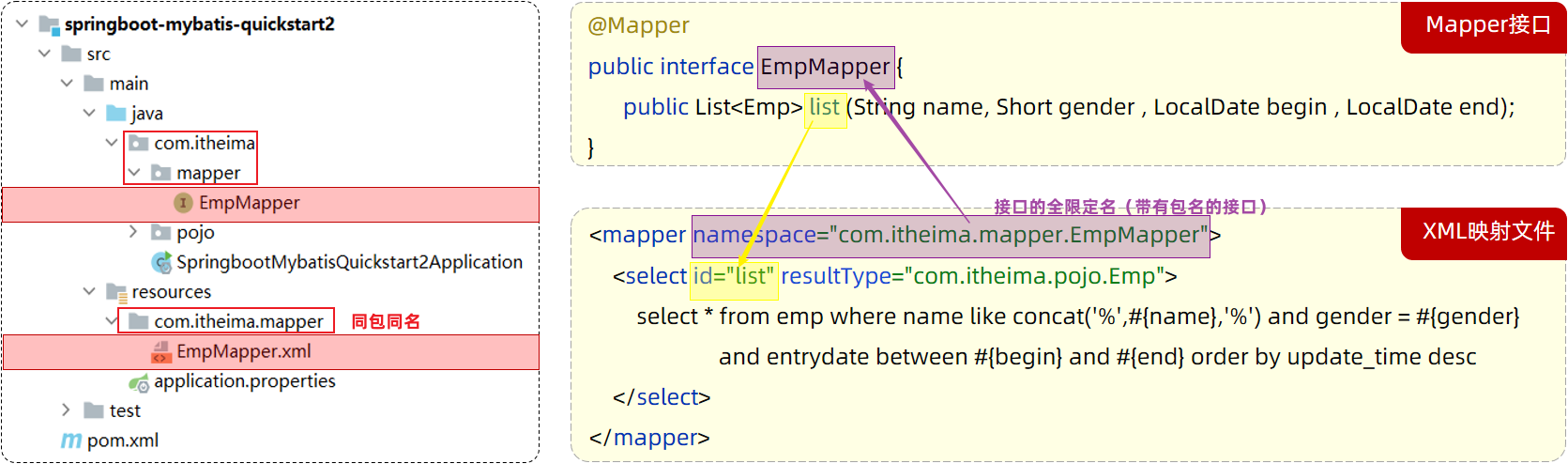
<select>标签:就是用于编写select查询语句的。
resultType属性,指的是查询返回的单条记录所封装的类型。
动态SQL
<select id="list" resultType="com.itheima.pojo.Emp">
        select * from emp
        <where>
             <!-- if做为where标签的子元素 -->
             <if test="name != null">
                 and name like concat('%',#{name},'%')
             </if>
             <if test="gender != null">
                 and gender = #{gender}
             </if>
             <if test="begin != null and end != null">
                 and entrydate between #{begin} and #{end}
             </if>
        </where>
        order by update_time desc
</select> <!--更新操作-->
<update id="update">
update emp
<!-- 使用set标签,代替update语句中的set关键字 -->
<set>
<if test="username != null">
username=#{username},
</if>
<if test="name != null">
name=#{name},
</if>
<if test="gender != null">
gender=#{gender},
</if>
<if test="image != null">
image=#{image},
</if>
<if test="job != null">
job=#{job},
</if>
<if test="entrydate != null">
entrydate=#{entrydate},
</if>
<if test="deptId != null">
dept_id=#{deptId},
</if>
<if test="updateTime != null">
update_time=#{updateTime}
</if>
</set>
where id=#{id}
</update>foreach
sql
delete from emp where id in (1,2,3);<foreach collection="集合名称" item="集合遍历出来的元素/项" separator="每一次遍历使用的分隔符"
open="遍历开始前拼接的片段" close="遍历结束后拼接的片段">
</foreach><?xml version="1.0" encoding="UTF-8" ?>
<!DOCTYPE mapper
PUBLIC "-//mybatis.org//DTD Mapper 3.0//EN"
"https://mybatis.org/dtd/mybatis-3-mapper.dtd">
<mapper namespace="com.wl.mapper.EmpMapper">
<!--删除操作-->
<delete id="deleteByIds">
delete from emp where id in
<foreach collection="ids" item="id" separator="," open="(" close=")">
#{id}
</foreach>
</delete>
</mapper>@Mapper
public interface EmpMapper {
//批量删除
public void deleteByIds(List<Integer> ids);
}include
在xml映射文件中配置的SQL,有时可能会存在很多重复的片段,此时就会存在很多冗余的代码
SQL片段: 抽取重复的代码
<sql id="commonSelect">
 	select id, username, password, name, gender, image, job, entrydate, dept_id, create_time, update_time from emp
</sql>然后通过<include> 标签在原来抽取的地方进行引用。操作如下:
<select id="list" resultType="com.itheima.pojo.Emp">
    <include refid="commonSelect"/>
    <where>
        <if test="name != null">
            name like concat('%',#{name},'%')
        </if>
        <if test="gender != null">
            and gender = #{gender}
        </if>
        <if test="begin != null and end != null">
            and entrydate between #{begin} and #{end}
        </if>
    </where>
    order by update_time desc
</select>
分页查询
当使用了PageHelper分页插件进行分页,就无需再Mapper中进行手动分页了。 在Mapper中我们只需要进行正常的列表查询即可。在Service层中,调用Mapper的方法之前设置分页参数,在调用Mapper方法执行查询之后,解析分页结果,并将结果封装到PageBean对象中返回。
1、在pom.xml引入依赖
<dependency>
    <groupId>com.github.pagehelper</groupId>
    <artifactId>pagehelper-spring-boot-starter</artifactId>
    <version>1.4.2</version>
</dependency>
2、EmpMapper
@Mapper
public interface EmpMapper {
    //获取当前页的结果列表
    @Select("select * from emp")
    public List<Emp> page(Integer start, Integer pageSize);
}
3、EmpServiceImpl
@Override
public PageBean page(Integer page, Integer pageSize) {
    // 设置分页参数
    PageHelper.startPage(page, pageSize);
    // 执行分页查询
    List<Emp> empList = empMapper.list(name,gender,begin,end);
    // 获取分页结果
    Page<Emp> p = (Page<Emp>) empList;
    //封装PageBean
    PageBean pageBean = new PageBean(p.getTotal(), p.getResult());
    return pageBean;
}